

Introduction
Choosing the right accounting platform can make or break how confidently you run your business finances. For UK sole traders, freelancers and growing SMEs, cloud-based accounting software has largely replaced spreadsheets and desktop solutions – and QuickBooks accounting software continues to be one of the most popular choices.
In this QuickBooks review UK, we’ll take a practical look at what QuickBooks accounting software actually delivers in 2026. From day-to-day bookkeeping and VAT submissions to automation, reporting and integrations, this review is designed to help you decide whether QuickBooks accounting software is the right fit for your business.
If you’re self-employed or running a limited company, you’re probably juggling invoicing, expenses, bank reconciliation and tax obligations alongside everything else. QuickBooks accounting software is designed to simplify those tasks, helping you save time, reduce errors and gain better visibility over your business finances without needing to be an accountant.
But is QuickBooks accounting software really worth the investment? How does it compare with alternatives like Xero or Sage? And is it the best accounting software for UK businesses in 2026?
We’ll answer all of that – and more – in this comprehensive review. You’ll also find a clear breakdown of QuickBooks pricing UK, a feature-by-feature analysis, real-world pros and cons, and details of the current QuickBooks offer, including 90% off for 7 months for eligible new customers.
👉 You can currently get 90% off QuickBooks for 7 months via this exclusive offer (subject to eligibility): https://accountingsoftwaredeals.co.uk/recommends/quickbooks-offer/
Whether you’re switching from spreadsheets, moving from another provider or choosing accounting software for the first time, this QuickBooks accounting software review will give you the information you need to make an informed decision.
Contents
What is QuickBooks accounting software?
QuickBooks is a cloud-based accounting and bookkeeping platform developed by Intuit, one of the world’s largest financial software companies. In the UK, QuickBooks Online is designed specifically for sole traders, freelancers, contractors, and small to medium-sized businesses that want to manage their finances digitally and stay compliant with HMRC.
At its core, QuickBooks accounting software combines bookkeeping, accounting, invoicing, expense tracking, and tax management into a single online system. Unlike traditional desktop software, everything runs in the cloud, meaning you can access your accounts from any device with an internet connection.
What makes QuickBooks particularly popular is its balance between power and usability. It offers advanced features like automated bank feeds, VAT returns, and real-time reporting, but packages them in a relatively intuitive interface that doesn’t require formal accounting knowledge.
In the context of this quickbooks accounting software review, it’s important to understand that QuickBooks isn’t just for accountants. While many accountants recommend or work with QuickBooks, the software itself is designed for business owners to use independently – with optional professional support if needed.
QuickBooks also scales with your business. You can start as a sole trader issuing a handful of invoices per month, then grow into a VAT-registered limited company with multiple users, payroll, and advanced reporting – all without changing platforms.
Key characteristics include:
- Cloud-based, browser and app access
- Designed for UK tax rules and HMRC integration
- Automation to reduce manual bookkeeping
- Modular pricing plans for different business sizes
For businesses that want to spend less time on admin and more time growing, QuickBooks accounting software positions itself as a long-term financial management solution rather than just a basic bookkeeping tool.
Who is QuickBooks best suited for?
QuickBooks is not a one-size-fits-all solution, but it does cater exceptionally well to a broad range of UK businesses. Understanding whether it fits your situation is key to deciding if it’s worth the investment.
Sole traders and freelancers
For sole traders, QuickBooks offers a clean way to separate personal and business finances, track income and expenses, and prepare for Self Assessment. The ability to categorise transactions automatically and generate profit summaries can significantly reduce stress at tax time.
Many freelancers choose QuickBooks bookkeeping software because it removes the need for spreadsheets and manual calculations, while still remaining affordable – especially when promotional pricing is available.
Limited companies and SMEs
For limited companies, QuickBooks becomes more powerful. Features like VAT tracking, multi-user access, advanced reporting, and accountant collaboration make it suitable for small teams and directors who want oversight without micromanaging every transaction.
It’s particularly effective for service-based businesses, consultancies, agencies, and trades where cash flow visibility matters.
Businesses working with accountants
QuickBooks is widely used by UK accountants and bookkeepers. This means you can give your accountant access to your live books, reducing back-and-forth emails and end-of-year panic. Many firms actively recommend it because it integrates smoothly into their workflows.
Who it may not be ideal for
That said, QuickBooks may not be the best option if:
- You run a very large enterprise with complex global accounting needs
- You require highly specialised industry accounting (e.g. advanced manufacturing)
- You want a completely free accounting solution with no paid tiers
For the vast majority of UK sole traders and SMEs, however, QuickBooks strikes a strong balance between affordability, capability, and ease of use.
👉 If you’re starting out or switching software, the current offer gives you 90% off for 7 months, making it a low-risk way to test whether it suits your business: https://accountingsoftwaredeals.co.uk/recommends/quickbooks-offer/
QuickBooks accounting software features overview
When evaluating any platform, features matter – but how those features actually work in practice matters more. This section breaks down the most important QuickBooks accounting software features you’ll use day to day.
Core accounting and bookkeeping
QuickBooks handles all core accounting functions, including:
- Income and expense tracking
- Double-entry accounting (behind the scenes)
- Chart of accounts management
- Automatic categorisation rules
You don’t need to understand accounting theory to use it effectively – the system is designed to guide you through tasks logically.
Automation and bank feeds
One of QuickBooks’ biggest strengths is automation. Secure bank feeds connect directly to your UK business bank account, pulling transactions in daily. From there, QuickBooks suggests categories based on previous behaviour, learning as you go.
This dramatically reduces manual data entry and the risk of human error.
VAT and tax tools
QuickBooks is fully compliant with Making Tax Digital (MTD) for VAT. You can:
- Track VAT automatically
- Prepare VAT returns
- Submit directly to HMRC
For many businesses, this alone justifies the subscription cost.
Mobile app functionality
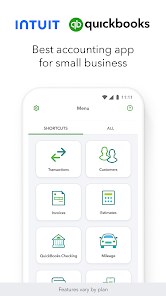
The QuickBooks mobile app allows you to:
- Snap photos of receipts
- Create and send invoices
- Track expenses on the go
- Monitor cash flow
This is particularly valuable for freelancers and tradespeople who don’t sit at a desk all day.
Multi-user and collaboration tools
Higher-tier plans allow multiple users with different permission levels. This is useful for growing teams or when collaborating with accountants and bookkeepers.
Overall, QuickBooks’ feature set is broad without being overwhelming – a key reason it scores highly in many quickbooks accounting software review comparisons.
QuickBooks bookkeeping software: Day-to-day usability
Features are meaningless if software is frustrating to use. Fortunately, QuickBooks bookkeeping software is designed with non-accountants in mind.
Interface and navigation
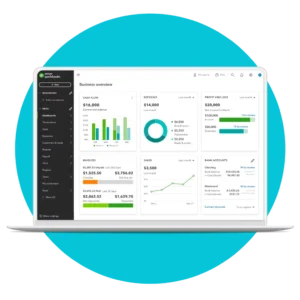
The dashboard gives you a real-time snapshot of your business health: income, expenses, profit, and outstanding invoices. Menus are logically organised, and most tasks can be completed in just a few clicks.
QuickBooks uses plain English where possible, avoiding unnecessary jargon – a big plus for new business owners.
Learning curve
There is a learning curve, but it’s manageable. Most users can:
- Create invoices
- Connect bank accounts
- Categorise transactions
within the first day or two. QuickBooks also provides built-in tutorials, tooltips, and help articles.
Speed and reliability
As a cloud platform, performance depends partly on your internet connection, but in general QuickBooks is stable and responsive. Downtime is rare, and updates happen automatically without disrupting your work.
Everyday workflows
Common bookkeeping tasks like reconciling accounts, reviewing expenses, or checking cash flow are streamlined. Automation means the software does much of the heavy lifting in the background, allowing you to focus on decisions rather than data entry.
For business owners who want bookkeeping to take minutes rather than hours, QuickBooks accounting software performs strongly in real-world use.
Invoicing, payments, and cash flow management
Getting paid on time is critical, and QuickBooks puts strong emphasis on invoicing and cash flow tools.
Professional invoicing
You can create branded invoices with your logo, colours, and payment terms. Invoices can be sent by email directly from the platform, with automatic reminders for overdue payments.
Recurring invoices are ideal for retainers or subscriptions.
Online payments
QuickBooks integrates with online payment solutions, allowing customers to pay invoices electronically. This can significantly reduce payment delays and improve cash flow consistency.
Cash flow tracking
Real-time dashboards show:
- Money coming in
- Money going out
- Short-term cash position
This visibility helps you plan ahead, avoid surprises, and make informed decisions.
Late payment management
You can track overdue invoices easily and follow up with clients professionally, without awkward manual chasing.
For many small businesses, these tools alone can lead to better cash flow – one of the most common pain points in early-stage companies.
👉 QuickBooks’ invoicing and cash flow tools are included even on lower-tier plans, and the current 90% off offer makes them extremely cost-effective to try.
Expenses, receipts, and bank reconciliation
Managing expenses is where many businesses lose time – and money. QuickBooks simplifies this significantly.
Expense tracking
Expenses are pulled automatically from connected bank accounts and credit cards. You can review, categorise, and approve them in bulk.
Receipt capture
Using the mobile app, you can photograph receipts and upload them instantly. QuickBooks uses OCR (optical character recognition) to extract key details and match them to transactions.
Mileage tracking
Some plans include mileage tracking, which is particularly useful for sole traders and contractors who travel for work.
Bank reconciliation
Reconciling your bank statements against your records becomes far quicker. QuickBooks highlights discrepancies and helps you resolve them systematically.
This combination of automation and oversight reduces errors and gives you confidence that your numbers are accurate – essential at tax time.
VAT, tax, and HMRC compliance in the UK
UK tax compliance is a major concern for businesses, and QuickBooks is built with this in mind.
Making Tax Digital (MTD)
QuickBooks accounting software is fully MTD-compatible, allowing VAT-registered businesses to submit returns directly to HMRC without third-party bridging software.
VAT tracking
The system tracks VAT on sales and purchases automatically, applying the correct rates and preparing calculations in the background.
Self Assessment support
While QuickBooks doesn’t replace an accountant, it makes Self Assessment preparation far easier by keeping records accurate and organised throughout the year.
Peace of mind
By reducing manual calculations and automating submissions, QuickBooks lowers the risk of errors, penalties, and missed deadlines.
For UK businesses navigating an increasingly digital tax environment, this compliance focus is a major advantage.
Reporting, insights, and financial visibility
Understanding your financial performance is essential for making informed business decisions, and this is where QuickBooks accounting software stands out. With real-time reporting, customisable dashboards and up-to-date financial data, QuickBooks gives UK businesses greater visibility over their finances.
Standard reports
QuickBooks accounting software includes a wide range of built-in financial reports, including:
- Profit and loss
- Balance sheet
- Cash flow statement
- VAT reports
Reports can be generated instantly, customised to suit your business and shared with accountants or team members whenever needed.
Real-time insights
Because transactions update automatically, QuickBooks accounting software provides real-time financial reporting, giving you an accurate view of your business rather than relying on outdated figures. This allows you to monitor performance, identify trends and respond more quickly to changing circumstances.
Decision-making support
Clear dashboards, visual reports and financial summaries make it easier to spot opportunities, identify potential issues and plan for future growth – even if you don’t have an accounting background.
For many UK businesses, these reporting tools are one of the reasons QuickBooks accounting software is consistently rated among the best accounting software solutions for small businesses, helping owners make more confident financial decisions.
Integrations, apps, and ecosystem
One of the biggest advantages of QuickBooks accounting software is its extensive integration ecosystem. With hundreds of third-party apps available, QuickBooks can connect with the tools you already use, helping to automate workflows and reduce manual data entry.
Popular integrations
QuickBooks accounting software integrates with a wide range of business applications, including:
- Payment platforms
- E-commerce systems
- CRM software
- Payroll services
These integrations make it easy to build a connected business ecosystem, allowing information to flow seamlessly between your accounting software and other essential business tools.
Accountant ecosystem
QuickBooks accounting software is widely used by accountants and bookkeepers across the UK, making it easy to find professional support whenever you need it. Many accountants are already familiar with the platform, helping to simplify collaboration, year-end accounts and tax compliance.
Scalability
As your business grows, QuickBooks accounting software grows with it. Its expanding ecosystem of integrations, combined with flexible subscription plans and powerful automation, means you can add new tools and functionality without needing to migrate to another accounting software platform.
Pricing, plans and value for money
QuickBooks offers multiple pricing tiers depending on your needs, typically ranging from basic sole trader plans to advanced SME packages.
Prices are subject to change, but generally scale based on:
- Number of users
- Reporting depth
- Automation features
What makes QuickBooks particularly attractive is promotional pricing.
👉 Current offer: Get 90% off for 7 months via this link (subject to eligibility): https://accountingsoftwaredeals.co.uk/recommends/quickbooks-offer/
This makes QuickBooks one of the most cost-effective premium accounting platforms to trial in 2026.
Pros and cons of QuickBooks accounting software
| Pros | Cons |
| Strong automation features | Not free long-term |
| Excellent UK tax compliance | Some advanced features locked behind higher tiers |
| Intuitive interface | Can feel feature-rich for very simple needs |
| Scales with your business | |
| Widely supported by accountants |
Overall, the pros significantly outweigh the cons for most UK businesses.
How QuickBooks accounting software compares to competitors
Compared to Xero, Sage, and FreeAgent, QuickBooks often wins on automation and usability for non-accountants.
While each platform has strengths, many users conclude through comparison that QuickBooks accounting software offers the best balance of power, price, and ease of use – especially when discounts apply.
Promotion conditions and offer details
The advertised QuickBooks promotion typically includes:
- 90% off subscription fees for the first 7 months
- Available to new QuickBooks customers only
- Applies to selected plans
Important:
- Subject to eligibility
- Terms and conditions apply
- Offers may change – always check the latest details via the official link
👉 Offer link: https://accountingsoftwaredeals.co.uk/recommends/quickbooks-offer/
QuickBooks accounting software FAQs
Is QuickBooks suitable for sole traders in the UK?
Is QuickBooks the best accounting software for small businesses?
Does QuickBooks handle VAT returns?
Can I use QuickBooks without an accountant?
Is QuickBooks bookkeeping software easy to learn?
Does QuickBooks have a mobile app?
How secure is QuickBooks?
Can I switch to QuickBooks from another platform?
Is the 90% off QuickBooks offer legitimate?
How long does the QuickBooks discount last?
Can I cancel during the discounted period?
Does QuickBooks include payroll?
Will QuickBooks help with cash flow management?
Recap: Is QuickBooks right for your business?
This QuickBooks accounting software review shows why QuickBooks accounting software remains one of the most popular choices for UK sole traders and SMEs in 2026. QuickBooks accounting software combines automation, HMRC compliance and usability in a way that genuinely reduces admin time while improving financial clarity.
Whether you’re managing invoices, tracking expenses, preparing VAT returns or planning for growth, QuickBooks accounting software offers tools that adapt to your needs. While it may be more than you need for ultra-simple setups, most UK businesses benefit from the visibility and control QuickBooks provides.
With generous introductory offers available, the barrier to trying QuickBooks has never been lower.
Conclusion and final verdict
If you’re looking for reliable, scalable and HMRC-compliant accounting software, QuickBooks accounting software is a strong contender – and for many businesses, one of the best accounting software solutions available in the UK. Its automation features, clear reporting and ease of use make QuickBooks accounting software particularly well suited to UK sole traders and growing businesses that want confidence in their numbers without complexity.
Crucially, QuickBooks accounting software grows with your business. From sole traders to expanding SMEs, QuickBooks accounting software scales without forcing you to relearn a new system as your business evolves.
👉 Take advantage of the current offer and get 90% off QuickBooks for 7 months (subject to eligibility):
https://accountingsoftwaredeals.co.uk/recommends/quickbooks-offer/
If you want to spend less time on bookkeeping and more time building your business in 2026, QuickBooks accounting software is well worth serious consideration.
If you’re still comparing providers, read our Best Accounting Software in the UK guide to see how QuickBooks compares with Xero, Sage and other leading platforms.
Subject to eligibility; offers may change. Always review current terms and conditions before subscribing.
Disclaimer: The content on this website is intended for informational purposes only and should not be construed as legal, financial, or professional advice. While we strive to ensure that the information is accurate and up-to-date at the time of publication, please be aware that regulations and circumstances may change. We recommend consulting with a qualified professional for personalised guidance specific to your situation. Additionally, some links on this website may be affiliate links, meaning we may earn a commission if you make a purchase through those links. Please ensure you read and understand all terms and conditions before making any decisions.